
HOW TO TRANSFER YOUR PAYMENT VIA UTORG
Visit Utorg site: https://utorg.pro/buy-bitcoin-with-usd/

Select crypto and fiat currency.
Specify the order amount.
Enter your crypto wallet address (in your case, it’s the Extrapharma wallet address).
Click “Buy”.

Enter your email and accept the terms.
Click “Proceed”.

Enter the verification code sent to your email.

Select your country of residence.
Click “Proceed”.
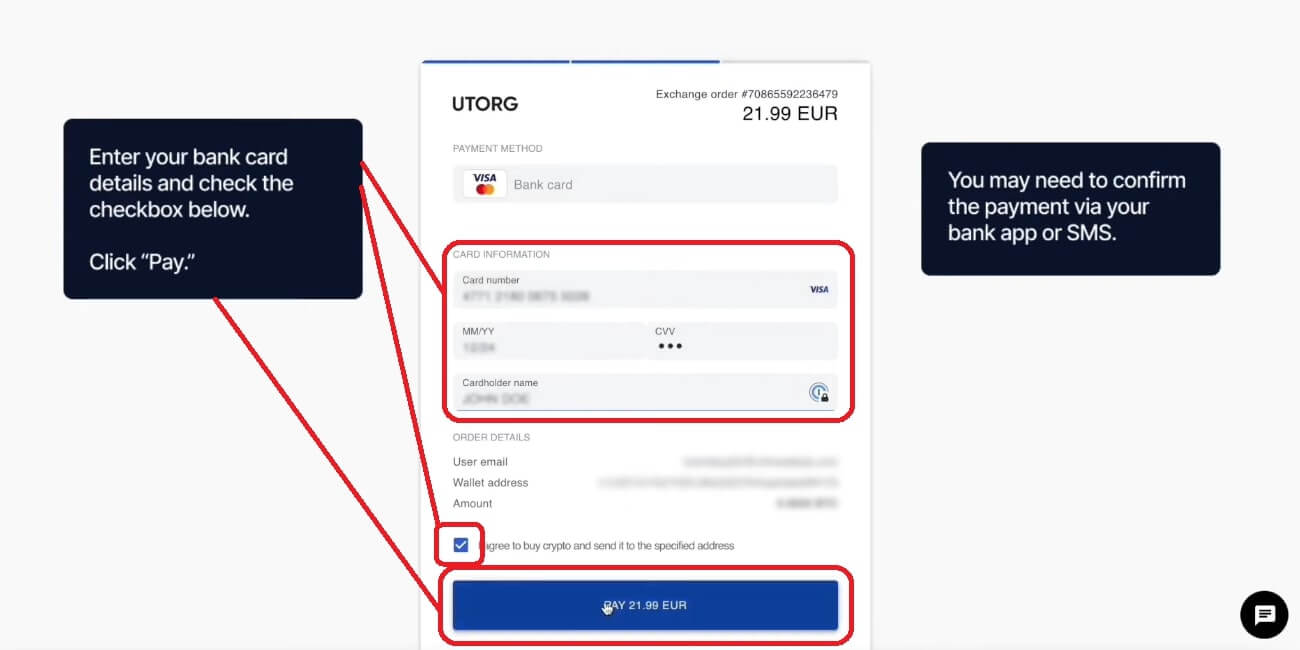
Enter your bank card details and check the checkbox below.
Click “Pay” (you may need to confirm the payment via your bank app or SMS).


Choose the country that issued your ID, select ID type and upload a photo of your ID card.
Click “Next” (you can switch between your phone and PC during the verification).


Click “I’m ready” to start the automatic video verification procedure.
Follow instructions.

That’s it.
You will
receive your crypto after successful verification (in our case it means that
you have successfully transferred your payment).
You can now
close this page. You will receive a transaction notification to your email.
See the official instructions for transferring payment via Utorg: